
Appearance
Alerts
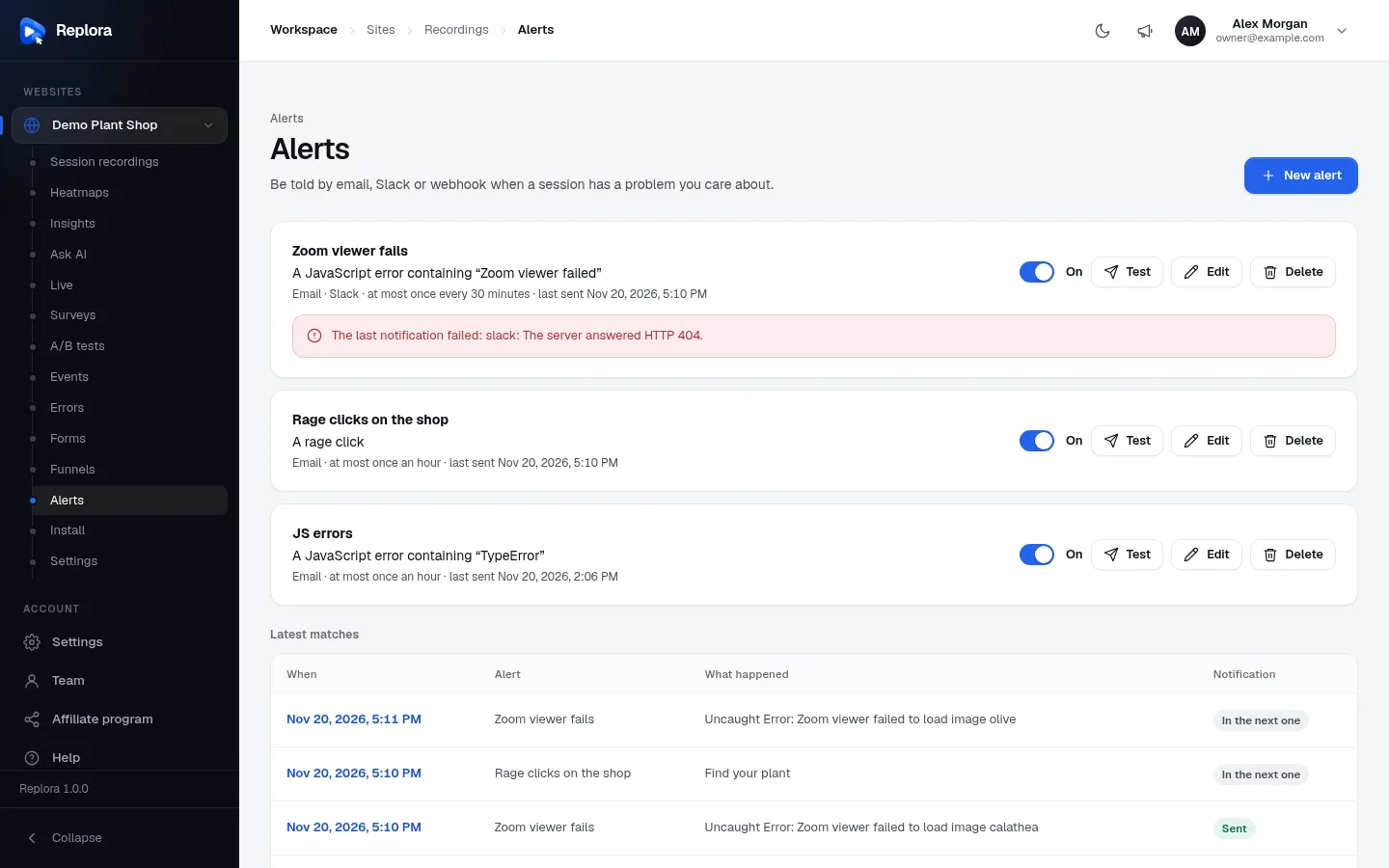
Alerts watch every new visit for you and tell you when something you care about happens: a JavaScript error on the checkout, a failed payment request, a visitor rage-clicking, a VIP customer arriving. You choose what to watch for, where to be told (email, Slack, a webhook) and how often at most. Each message links to the visit, so you can watch it right away.
Where to find it: in the sidebar, under your website, click Alerts (for example Demo Plant Shop › Alerts).
How alerts work
- Each new batch of recording data is checked against the website’s alerts that are on, as it arrives. You’re told within moments of the visit, not the next day.
- Each session counts once per alert, however many times it hits the trigger.
- How often sets a quiet time after each notification. Sessions that match during the quiet time are not lost: they are listed as In the next one and sent together in the next notification, when the quiet time ends.
Create an alert
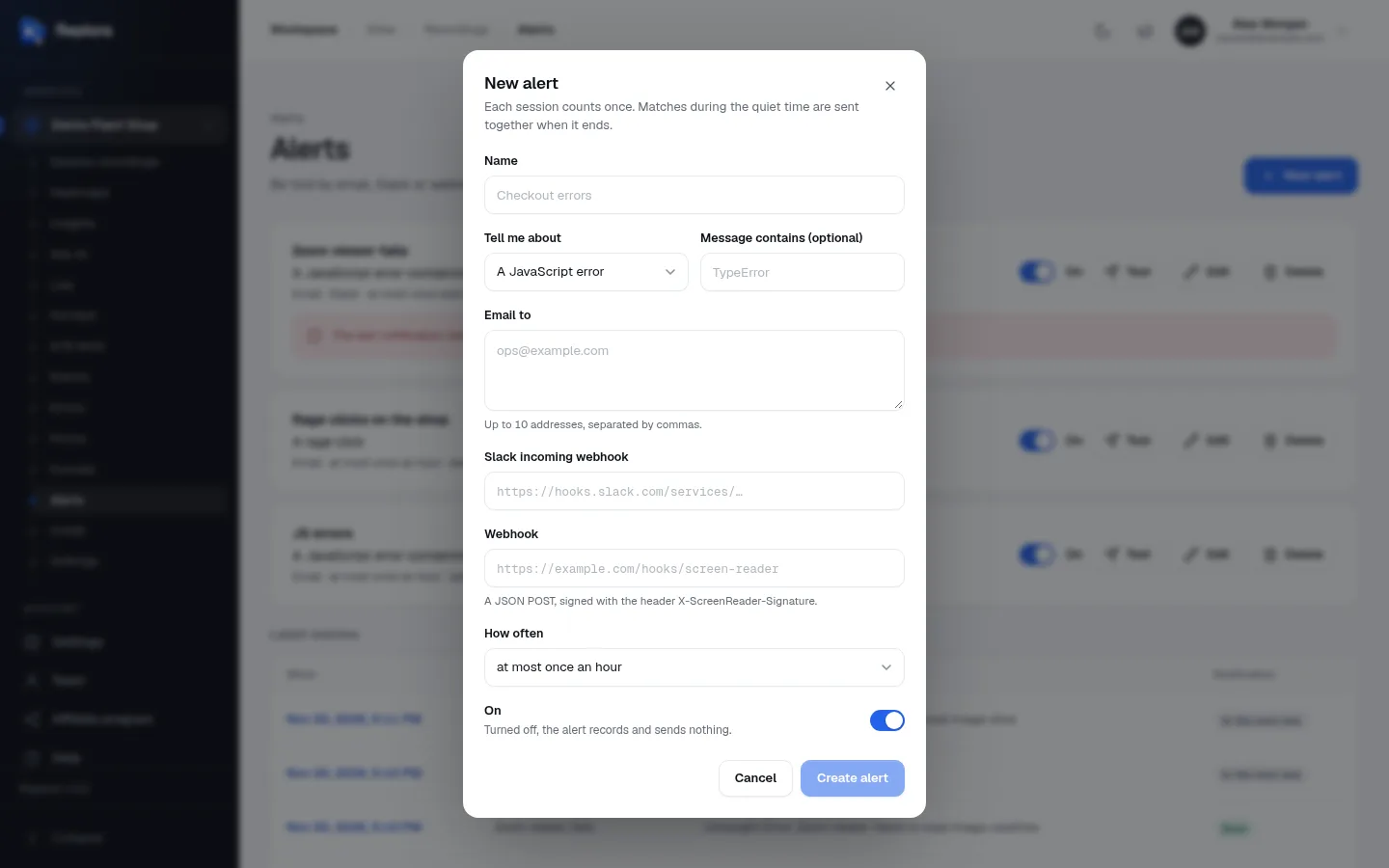
- Click New alert (top right).
- Enter a Name (up to 120 characters), for example Checkout errors.
- In Tell me about, choose the trigger, and fill in its text if it has one (see the table below).
- Choose where to be told: Email to, Slack incoming webhook, Webhook, or several. At least one is needed.
- Choose How often you may be told at most.
- Leave On switched on, and click Create alert.
- Click Test on the new alert to check the messages arrive.
Triggers
| Tell me about | Matches a session when… | Extra field |
|---|---|---|
| A JavaScript error | a JavaScript error happens. | Message contains (optional): only errors whose message contains this text, such as TypeError. Empty: any error. |
| A failed request | a call from the page to a server fails (no answer, or an error status of 400 or higher). | Address contains (optional): only calls to addresses containing this, such as /api/. Empty: any failed request. |
| A rage click | a visitor rage-clicks (the third click within a second in the same spot). | None. |
| A dead click | a visitor clicks something that looks clickable and nothing happens. | None. |
| A session tag | the session gets this tag (set by your site with tagSession). | Tag (required, up to 64 characters), such as plan; Value (optional): only when the tag has exactly this value, such as pro. |
| A visit to a page | a visitor opens a page whose address contains the text. | Address contains (required), such as /checkout. |
“Contains” ignores upper and lower case. Texts can be up to 500 characters. The alert’s card says in words what it watches for, for example A JavaScript error containing “TypeError” or The tag “plan” set to “pro”.
Channels
| Field | What to enter | Notes |
|---|---|---|
| Email to | Up to 10 addresses, separated by commas (spaces, semicolons and new lines work too). | Duplicates are removed. |
| Slack incoming webhook | The address of a Slack incoming webhook, starting with https://hooks.slack.com/services/…. Create one in Slack (Apps › Incoming Webhooks) for the channel you want. | Only Slack incoming-webhook addresses are accepted. |
| Webhook | Any https:// address of your own system (or Zapier, Make…). Replora sends a JSON POST there for each notification. | Signed with the header X-Replora-Signature (HMAC-SHA256). Once the alert is saved, the field shows the secret to check the signature with. Details for developers are in the Replora Docs. |
Addresses on private networks are refused for security unless the installation allows them.
How often
| Choice | Meaning |
|---|---|
| at most once every 5 minutes | |
| at most once every 15 minutes | |
| at most once an hour | The default. |
| at most once every 6 hours | |
| at most once a day |
After a notification, the alert waits that long before sending the next one; matches in between are bundled into it.
The alerts list
Each alert is a card:
| Part | What it shows / does |
|---|---|
| Name | The alert’s name. |
| Trigger | What it watches for, in words. |
| Small print | Its channels (Email, Email (2), Slack, Webhook), how often, and when it was last sent (or never sent). |
| On / Off switch | Turns the alert on or off at once. Turned off, the alert records and sends nothing. Off alerts are greyed out. |
| Test | Sends a test message to every channel now (“This is a test of the alert …”). It points at no real session and doesn’t change the alert’s state. You then see “Test sent to Email, Slack” or “Test failed: slack: …” with the reason. Up to 10 tests a minute. |
| Edit | Opens the dialog to change anything, then Save. |
| Delete | “Delete this alert?”: the alert and its list of matches are deleted; recordings stay. |
| Red notice | The last notification failed: … with the reason, for example a Slack address that no longer exists (The server answered HTTP 404). Fix the address with Edit, then use Test. |
Latest matches
Under the alerts, the 50 latest sessions that matched any of them:
| Column | Meaning |
|---|---|
| When | The moment it matched. Click to open the replay right there. |
| Alert | Which alert matched. |
| What happened | The detail: the error message, the failed request (POST /api/pay → 500), the clicked element, the tag (plan=pro) or the page. |
| Notification | Sent, or In the next one while the alert is in its quiet time. |
Limits and who can do what
- In the SaaS edition your plan sets how many alerts your account may have (all websites together): “Your plan allows n alerts. Upgrade the plan or delete an alert first.”
- Managers and members create, edit, delete, switch and test alerts. Viewers see the alerts and their matches but can’t change them.
Ideas for alerts
| Name | Trigger | Channel |
|---|---|---|
| New script errors | A JavaScript error, message left empty | Slack #dev, at most once every 15 minutes |
| Checkout requests failing | A failed request, address contains /checkout | Slack #dev |
| Payment API failing | A failed request, address contains /api/payment | Webhook to your on-call tool |
| Frustrated shoppers | A rage click | Email to the product team, at most once a day |
| VIP visit | A session tag plan = enterprise | Email to the account manager |
| Someone reached pricing | A visit to a page, address contains /pricing | Slack #sales, at most once an hour |